
MiriCanvas AI PPT Alternative: Compared with MOVO
The MOVO team made this comparison page. MOVO is our product. MiriCanvas details come from the official MiriCanvas pricing page, feature page and help center, opened on Nov 1, 2026. Every cell has an evidence level and a source.

The short answer
MiriCanvas is a tool for designing with templates and elements yourself, with an AI presentation feature on top. MOVO is a tool where you give a topic or files, get a presentation deck and fix it by chat.
MiriCanvas may fit if you need a PPT with editable text on the free plan, design posters and videos in the same tool, or often have a team editing the same file at once.
Look at MOVO if you want to attach files and build a deck even on the free plan, fix the slide you are viewing by chat after it is made, and also hand off to Figma.
Make an AI PPT in MOVO in 4 steps
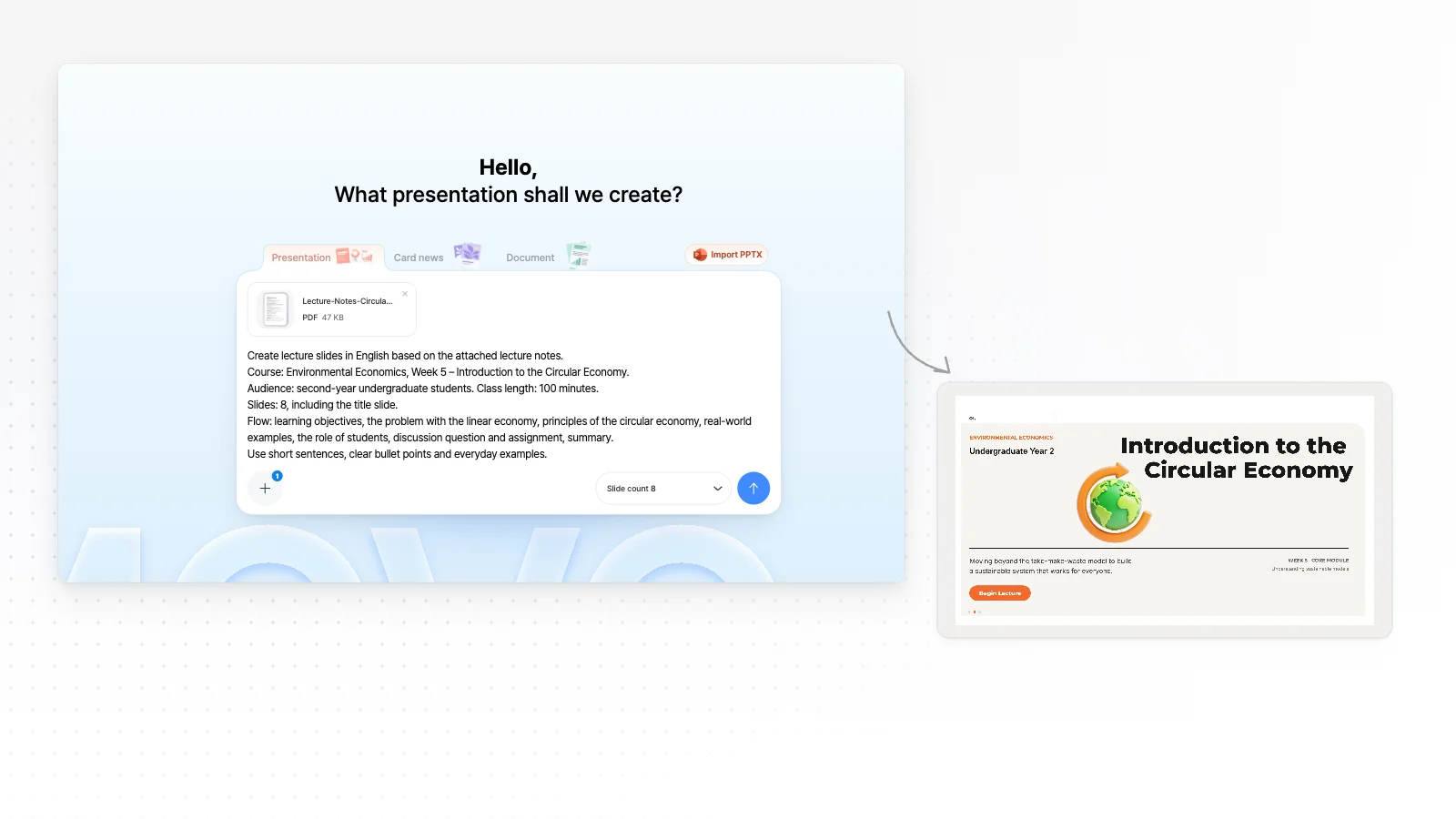
Type a topic or attach files
In the box above, say who the talk is for and what it covers, or attach PDF, PNG, JPG, WebP, TXT, CSV, DOCX, XLSX files. Unlike MiriCanvas, the Free plan also lets you attach files (3 files, 5 MB each).
Check the outline first
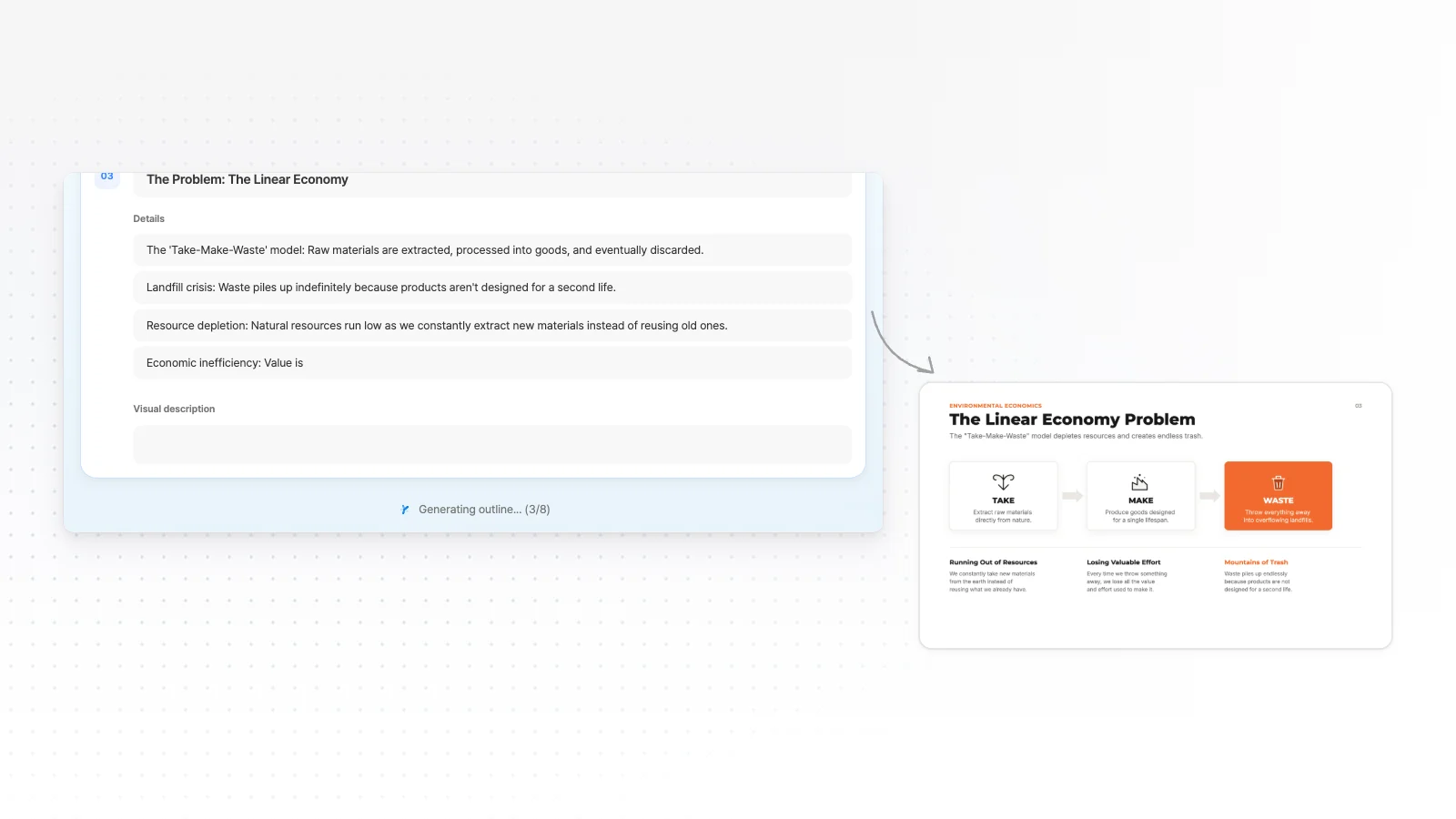
Before it builds, MOVO shows an outline with each slide's title and key points. Fix missing content or the order here.
Pick a style and build
Choose from 200+ presentation styles, set colors and fonts if you want, and build the slides.

Fix the slide you choose by chat, then export
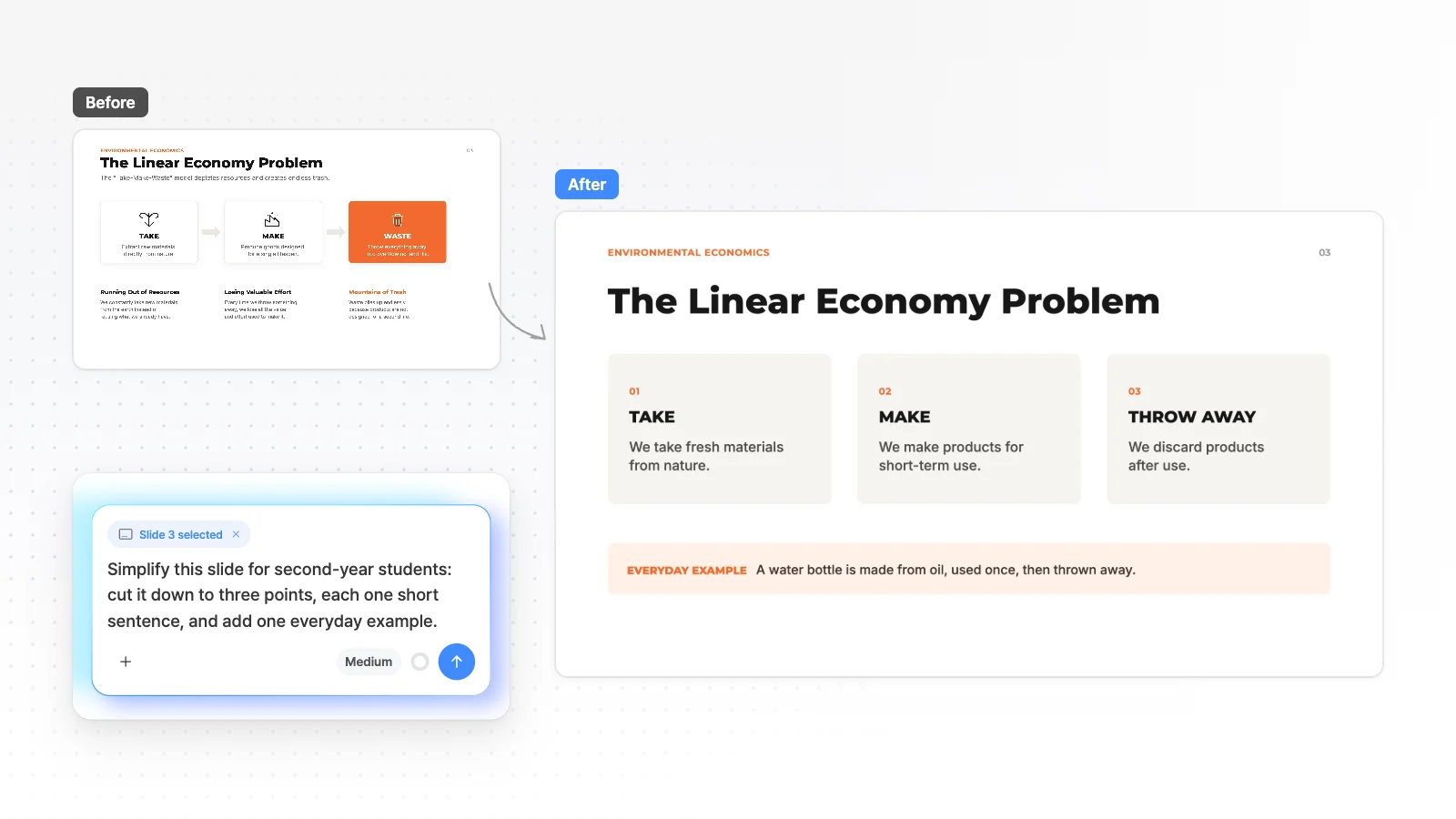
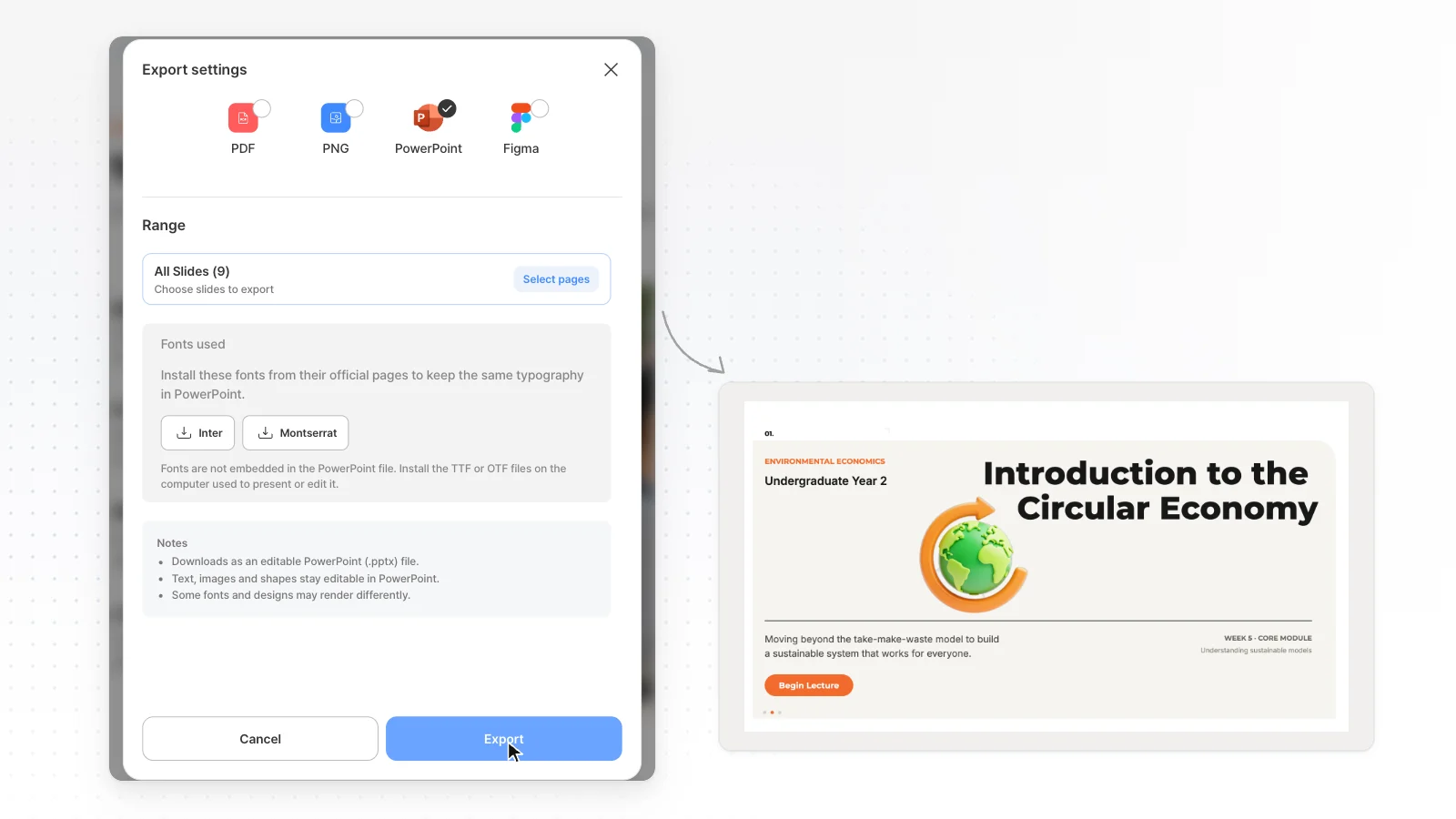
Even after it is made, point to the slide you are viewing and fix it by chat, or edit text, images and shapes directly. When it's done, export to the format you need from PPTX, PDF, PNG, Figma (PPTX, Figma from Pro).
MOVO vs MiriCanvas comparison table
Every cell has an evidence level and a source number. Unknown means we couldn't find an explicit statement in the official docs, not that the feature is missing.
| Item | MiriCanvas | |
|---|---|---|
| What's free | ||
| Free AI generation | 300 credits every month, up to 5 slides per deckMOVO tested[8] | AI presentations 5 times a month, up to 30 slidesOfficial docs[2] |
| Building from attached files | Attach PDF, PNG, JPG, WebP, TXT, CSV, DOCX, XLSX even on Free (5 MB each, 3 files)MOVO product[8] | Making an AI presentation from attached files is Pro only. Text input up to 20,000 charactersOfficial docs[3] |
| Free PPT download | PPTX from Pro. Free exports PDF, PNG with a watermarkMOVO tested[8] | Editable-text PPT 3 times a dayOfficial docs[1] |
| PPT file | ||
| Fonts in the PPT | Fonts not on the export server fall back to ArialMOVO tested[9] | Keeps the fonts you used. Some fonts need to be installed yourselfOfficial docs[4] |
| Tables and charts in the PPT | Export as shapes and text, not PowerPoint table or chart objectsMOVO product[9] | Not found in the official docsUnknown |
| After it's made | ||
| Fixing with AI after generation | Point to the slide you are viewing and fix it by chatMOVO product[9] | Change the structure by chat at the outline step, then edit directly in the editor after generationOfficial docs[3] |
| Download formats | PPTX, PDF, PNG, Figma (PPTX and Figma from Pro)MOVO tested[8] | JPG, PNG, PDF, PPTX, MP4 and GIFOfficial docs[5][1] |
| Undo and history | Step back with undo (no version history)MOVO product[9] | Free shows 7 days of history, Pro shows and restores 7 daysOfficial docs[1] |
| Working together | A shared link opens as a slideshow without sign-in, and with Copy allowed a colleague can copy it and editMOVO product[9] | Real-time co-editing for 5 people on Free, 10 on ProOfficial docs[6] |
| Other | ||
| Templates and styles | 200+ presentation stylesMOVO tested[9] | Says it has over 800,000 templatesOfficial docs[7] |
| Devices | AI chat only on phones, direct editing on desktopMOVO product[9] | AI presentations on PC desktop only. The service runs on PC, tablet and mobileOfficial docs[2][7] |
| Price | ||
| Starting paid price (billed monthly) | Pro $19.99/month (USD, $192 billed yearly)MOVO tested[8] | Pro ₩14,900 per member a month, ₩160,800 billed yearly (VAT included)Official docs[1] |
Evidence levels
- MOVO tested
- Measured on the live MOVO product (Aug to Oct 2026)
- MOVO product
- Behavior checked in the MOVO product and code (Nov 1, 2026)
- Official docs
- From the other company's official pricing page or help center. Check dates are under How we compared
- Unknown
- No explicit statement in the official docs we opened, or it needs a login. This does not mean the feature is missing
The differences in detail
Making AI presentations for free
MiriCanvas says free members can make AI presentations 5 times a month, up to 30 slides. MOVO Free gives 300 credits every month and up to 5 slides per deck.
The two count free limits in different units, so times and credits can't be compared directly. If each deck has many slides, the MiriCanvas free limit is more generous.
Building from your files
Per the official MiriCanvas guide, making an AI presentation from attached files is Pro only. You can paste up to 20,000 characters of text.
MOVO builds from 3 attached PDF, PNG, JPG, WebP, TXT, CSV, DOCX, XLSX files (5 MB each) even on the free plan. It reads what you attach and plans a new deck, and it doesn't carry over the original look.
Downloading a PPT to edit
Per the MiriCanvas plan comparison table, the free plan allows 3 editable-text PPT downloads a day. MiriCanvas says a PPT downloaded with editable text keeps the fonts you used, and some fonts need to be installed yourself.
In MOVO, PPTX export starts on Pro. Text exports as text boxes and shapes as PowerPoint shapes, but fonts not on the export server fall back to Arial, and tables and charts export as shapes and text.
How editing works after generation
With MiriCanvas AI presentations, you change the structure by chat at the outline step, then polish text, images and layout in the editor after it is built (per the official guide).
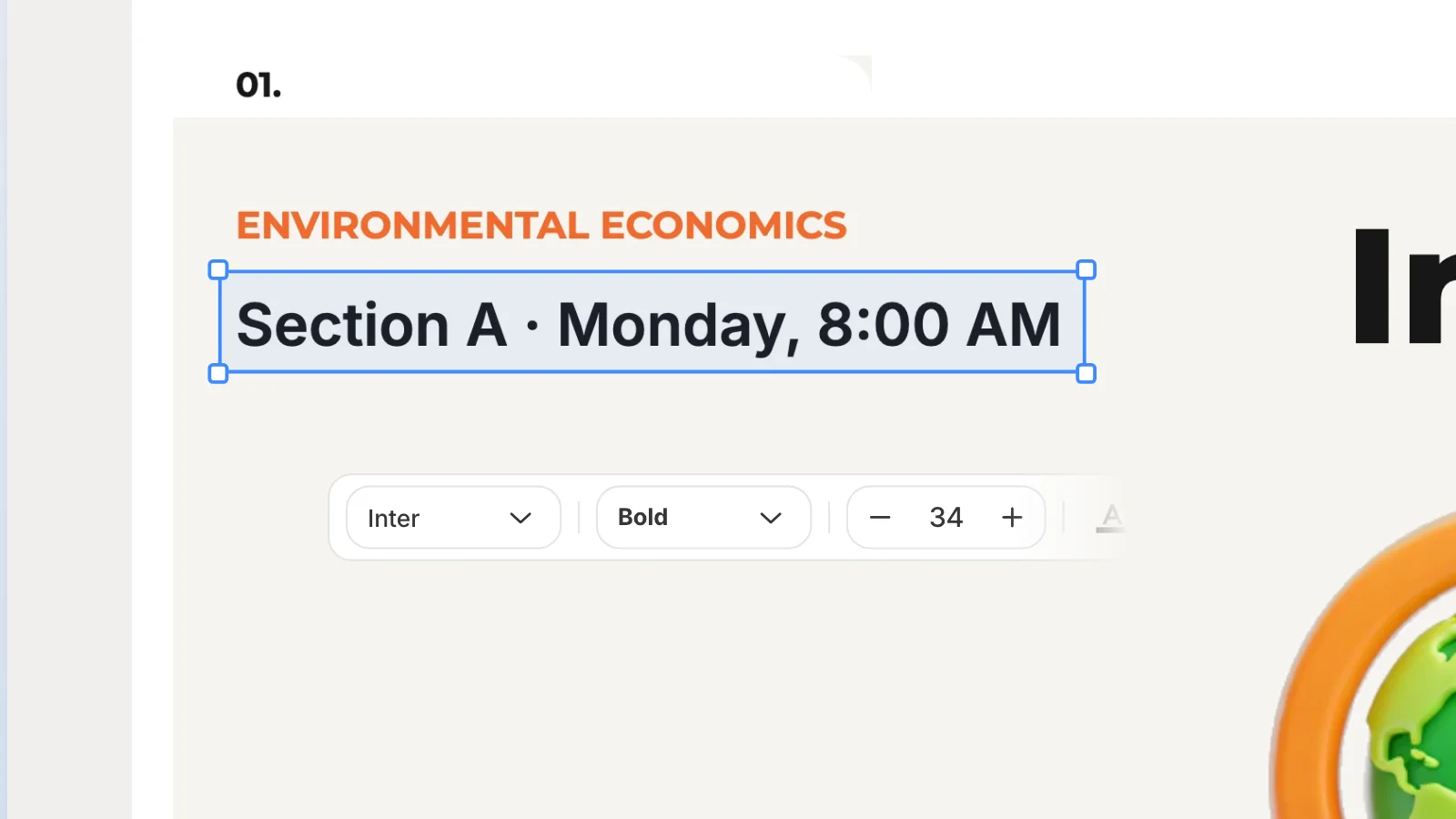
In MOVO, even after the slides are made, you point to the slide you are viewing and fix it by chat. You can also edit text, images and shapes directly in the editor.
Working together and going back
MiriCanvas supports real-time co-editing (5 people on Free, 10 on Pro), and you can see 7 days of work history (Pro can also restore it).
MOVO shows a slideshow through a shared link without sign-in, and with Copy allowed a colleague can take it into their own project and edit it. There is no version history, and you step back with undo.
Price
MiriCanvas Pro is ₩14,900 per member a month billed monthly (VAT included), or ₩160,800 billed yearly. MOVO Pro is $19.99 a month.
The currency and billing unit (per member) differ, so a simple comparison is hard. Prices change, so check each official page before you pay.
Which one fits which case
Staying with MiriCanvas is better when
- You need a PPT with editable text on the free plan (3 times a day)
- The fonts you used must stay in the PPT
- You design posters and videos (MP4, GIF) in the same tool
- Your team edits the same file together in real time
- You also need to work in the tablet or mobile app
MOVO fits when
- You want to attach PDF, Word or Excel files and build a deck even on the free plan
- You want to fix the slide you are viewing by chat even after the slides are made
- You need to hand off a Figma file as well as a PPTX (Pro and Max)
- You want to check an outline with each slide's title and key points before it builds
- You want to start from 200+ presentation styles
Official MiriCanvas links
How we compared
- The MOVO team wrote this page, and MOVO is our product.
- MiriCanvas cells were copied from the official MiriCanvas pricing page, feature page and help center, opened on Nov 1, 2026.
- MOVO cells are split into values measured on the live product (MOVO tested) and behavior checked in the product and code (MOVO product).
- The two services count free limits in different units (times and credits), so we didn't compare those numbers directly.
- When the official docs had no explicit statement, the cell says Unknown, which does not mean the feature is missing.
Sources
Numbers in the table and text point to the sources below. Check dates are listed under How we compared, and prices and limits can change.
- MiriCanvas pricing
- MiriCanvas AI presentation overview
- MiriCanvas help: making an AI presentation
- MiriCanvas help: PPT download
- MiriCanvas help: download formats
- MiriCanvas help: co-editing
- MiriCanvas home
- MOVO pricing (plan limits, export formats and price)
- MOVO product, code and export checks (Nov 1, 2026)
Frequently asked questions
Is MiriCanvas AI free?
MiriCanvas says free members can make AI presentations 5 times a month, up to 30 slides (checked Nov 1, 2026). MOVO Free makes decks of up to 5 slides with 300 credits every month.
How do I make an AI PPT in MiriCanvas?
Per the official MiriCanvas guide, you enter a topic or script (up to 20,000 characters), refine the structure by chat at the outline step and build 6 to 30 slides. After it is built you edit text, images and layout directly in the editor, and this feature works on PC desktop only.
Can I use MOVO instead of MiriCanvas?
If you build a presentation deck from a topic or files, fix it by chat and hand it off as PDF, PPTX or Figma, you can use MOVO. If you design posters and videos in the same tool or often have a team editing together in real time, MiriCanvas may fit better.
Can I attach files and make a PPT for free?
MOVO Free builds a deck from up to 3 attached PDF, PNG, JPG, WebP, TXT, CSV, DOCX, XLSX files at a time (5 MB each). Per the official MiriCanvas guide, making an AI presentation from attached files is Pro only (checked Nov 1, 2026).
Can I get a PPT file for free?
MOVO Free exports PDF, PNG, and PPTX starts on Pro at $19.99 a month. Per the MiriCanvas plan comparison table, the free plan allows 3 editable-text PPT downloads a day (checked Nov 1, 2026).
Who wrote this comparison and how was it checked?
The MOVO team wrote this page. MiriCanvas cells were copied from the official MiriCanvas pricing page, feature page and help center on Nov 1, 2026, and each cell links its source.
Related pages
MOVO vs Gamma
Gamma compared on free limits, PPTX export and importing your files.
PDF to Presentation
Turn a PDF you already have into new presentation slides.
Carousel Maker
Turn a topic or your files into a 4:5 carousel draft.
Genspark alternative
Genspark AI Slides compared on free use, file export, outlines and fact checks.